Bank Audit Trail Gaps in Generic PDF Converters
Why generic PDF converters break bank audit trails - require balance checks, OCR flags, and source traceability before importing to the GL.
Last updated 2026-07-02
A clean spreadsheet does not mean your bank data is safe to post. If a PDF converter skips balance checks, drops reference numbers, misreads dates, or keeps no processing log, your audit trail can break before the data reaches the GL.
Here’s the short version: I’d treat bank statement conversion as a control point, not a file-format step. If I were reviewing a process like this, I’d want it to check the math, keep source links, flag OCR problems, track reruns, and stop duplicate imports. Without that, a single sign error can turn a $100.00 withdrawal into a $100.00 deposit and create a $200.00 reconciliation gap.
What matters most:
- Balance tie-out: opening balance + credits − debits = closing balance
- Running balance checks: each row should match the next balance movement
- Stable field mapping: dates, descriptions, references, debits, credits, and balances stay in the same place
- Statement checks: page count, period, totals, and transaction count match the source PDF
- OCR review flags: scanned rows with low confidence get flagged
- Source traceability: each row links back to the PDF
- Conversion history: reruns, edits, and statuses are logged
- Duplicate control: overlapping statements do not post twice
Bottom line: if a tool only extracts text, I would not treat the output as audit-ready data.
Quick comparison
| Check | Generic PDF converters | Audit-ready bank conversion tools |
|---|---|---|
| Balance validation | Usually no | Yes |
| Running balance test | Usually no | Yes |
| Field consistency | Can shift by layout | Standard output |
| Scan/OCR review | Limited | Flagged for review |
| Source traceability | Often missing | Included |
| Conversion history | Often missing | Logged |
| Duplicate detection | Weak or none | Included |
| Import formats | Basic CSV/Excel | CSV, Excel, and accounting formats |
If you want bank data that stands up in reconciliation, review, and audit work, I’d focus on controls before import, not cleanup after export.
The Main Audit Trail Gaps in Generic PDF Converters
No Balance Checks or Running Balance Validation
The biggest hidden gap is simple: no balance check.
Generic PDF converters can pull rows from a bank statement, but they usually stop there. They don't test whether the statement actually ties out. In plain English, they don't confirm that:
opening balance + credits − debits = closing balance
That leaves room for errors to slip into the general ledger with no warning at all.
Audit-ready tools go further. They check each running balance on the statement, row by row. Every balance should match the prior balance plus or minus the transaction amount. Generic tools skip those printed running balances entirely. So if one digit gets misread, every balance after that point can be off too. [7][5]
Once that balance check is gone, the next problem usually shows up fast: bad field mapping.
Weak Field Mapping, Lost References, and No Statement-Level Controls
Generic tools often miss the small details that matter most in an audit trail. They may drop reference numbers, split multi-line descriptions, or flip debit and credit columns.
That causes a bigger issue than it might seem at first. If check numbers or ACH reference IDs disappear, the link from source document to GL entry starts to fall apart. An auditor may still see a transaction in the system, but tracing it back to the original PDF becomes much harder. That's where audit evidence starts to weaken - not because the file looks bad, but because the chain between source and record is broken.
These tools also tend to skip statement-level checks, including:
- page count
- statement period
- total tie-out
There's another problem here. Bank layouts change by institution and even by statement period. So the same converter can output one structure this month and a different one next month. That makes it tougher to build an import template you can trust from one statement to the next. [1]
Those mapping issues get worse when the statement is scanned instead of text-based.
Poor Scan Handling and No Conversion History
Scanned bank statements bring OCR risk with them. Rows can drop out, columns can shift, and positive or negative signs can flip. A withdrawal can even land in the deposit column with no warning that anything changed. [6]
What makes this harder to catch is the lack of a processing log.
Generic converters usually don't record which PDF version was processed, whether the file was rerun, or whether the same statement got imported twice. If someone fixes an OCR mistake by hand, the old value is often overwritten with no record of who changed it, when they changed it, or what was there before. [12]
At that point, OCR mistakes stop being just a formatting issue. They become an audit defense issue.
And if the same account gets processed more than once without deduplication, duplicate transactions can slide into the general ledger without any alert. In many cases, nobody spots the problem until reconciliation weeks later.
These gaps are easier to scan in summary form.
| Audit Trail Gap | How It Shows Up |
|---|---|
| No balance check or running balance validation | Opening and closing balances do not tie; one bad row breaks the running balance |
| Weak field mapping and no statement-level controls | Descriptions and references are lost; page count, period, or totals do not match |
| Poor OCR handling and no processing log | Rows shift, duplicate, or lose signs; no log of reruns or corrections |
sbb-itb-2afa642
How These Gaps Affect U.S. Accounting Workflows
Reconciliation Delays, Review Friction, and Audit Exposure
Those control gaps don't stay small for long. They turn into close-the-books headaches fast. When bank data isn't verified, reconciliation slows down, GL support gets weaker, and review becomes harder for controllers, CPAs, or IRS examiners.
The first hit is a slower close. A bookkeeping automation workflow helps reduce costs, as manual bank reconciliation already costs bookkeepers about $71 per client per month in labor alone [4]. If the source data also has mapping errors, missing references, or sign-reversed transactions, cleanup takes even more time. A $100 withdrawal imported as a $100 deposit creates a $200 discrepancy, and accounting software like QuickBooks or Xero may not flag the mistake [4][14].
That kind of error sounds small on paper. In practice, it can send someone digging through statements, exports, and journal detail just to find out what went wrong.
Auditors want a clear trail from the PDF to the GL entry. If reference numbers are missing, or there's no source-file column, that trail is tough to prove. IRS examiners compare year-end bank reconciliations to the books line by line [4]. When the data starts with unverified extractions, the review gets harder right away.
The same weak controls also make repeat imports and period drift more likely.
Duplicate Imports and Inconsistent Data Across Periods
When conversion history is missing, duplicate posting gets much harder to spot. If there are no stable transaction IDs and no source-file column, it's easy to upload overlapping statements twice. Carry-forward rows can then hit the general ledger twice [4][13].
Date formats add another layer of risk. If one export is read as MM/DD/YYYY and another as DD/MM/YYYY, a January 5 transaction can turn into May 1 with no error message at all [4]. That throws off period consistency and makes tie-out work more painful.
What an Audit-Ready Bank Statement Conversion Process Should Include
Balance Verification, Statement-Level Checks, and Exception Statuses
An audit-ready conversion process checks the statement before anything gets imported. That means doing statement-level checks first, not after the fact.
Start with the core math: opening balance + credits − debits = closing balance [11][6]. If that doesn’t line up, something went off track between the source PDF and the exported file. Then check each row’s running balance against the prior row plus the current transaction amount. That helps pinpoint the exact row where extraction broke down [7].
Statement-level controls matter just as much. You want to verify page continuity, check for missing pages, and match the transaction count against the summary page [15][9]. Those checks help catch the kind of issues that can slip by if you only look at line items.
And the output shouldn’t stop at a simple yes or no. It should return a clear status [7]:
| Status | What It Means | Action Required |
|---|---|---|
| Reconciled | Math matches and the chain is intact | Safe to import |
| Reconciled with Flags | Math matches, but some rows have low confidence | Review flagged rows only |
| Needs Review | Bookends do not match | Treat as a draft and find the first chain break |
Once the math checks out, the export needs to keep every transaction in a stable accounting format.
Standardized Field Mapping, OCR Review Signals, and Source Traceability
Every export should use the same field structure: Date, Description, Reference No., Debit, Credit, Balance, Category [11][2][8]. That consistency makes imports smoother and cuts down on cleanup work.
Dates and numbers need to be normalized too. Use YYYY-MM-DD for dates and U.S. number formatting, with commas for thousands and periods for decimals, to avoid import issues [11][8][6].
For scanned statements, row-level OCR confidence flags should be visible. A file can have high character-level OCR accuracy and still end up with row-level mistakes, which is where review signals help [6][7].
Each row should also include a source-file identifier. That way, any transaction can be traced back to the original PDF without digging around or guessing [11][10].
Import-Ready Output Formats for Accounting Teams
The output format has to stay ready for import while still keeping source traceability intact. Accounting teams need files they can use as-is, including Excel, CSV, QuickBooks CSV, Xero CSV, OFX, QBO, QIF, and MT940 [11][6].
ClearlyLedger supports this process with balance-verified, import-ready outputs and conversion history [11].
Comparison Table: Generic PDF Converters vs. Audit-Ready Bank Conversion Tools
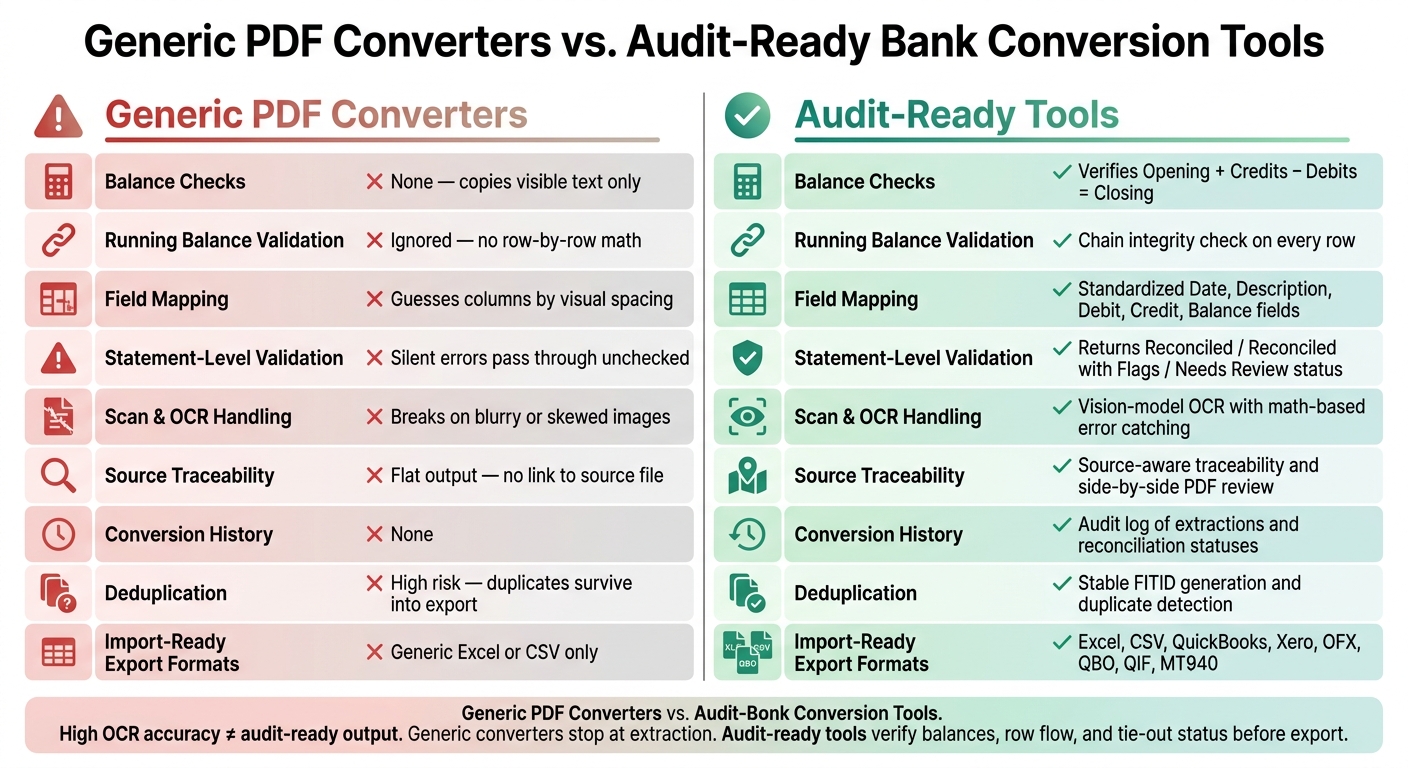
Generic PDF Converters vs. Audit-Ready Bank Conversion Tools: Key Control Gaps
The table below shows the controls that generic converters tend to miss and what audit-ready tools add before export. Think of it as a quick gut check before bank data lands in the GL.
| Feature | Generic PDF Converters | Audit-Ready Tools (e.g., ClearlyLedger) |
|---|---|---|
| Balance Checks | None; copies visible text only [1] | Verifies Opening + Credits − Debits = Closing before export [11] |
| Running Balance Validation | Ignored; no row-by-row math [1] | Chain integrity check on every row; pinpoints the exact break [7] |
| Field Mapping | Guesses columns based on visual spacing [2] | Bank-aware logic with standardized Date, Description, Debit, Credit, and Balance fields [11] |
| Statement-Level Validation | None; silent errors pass through unchecked [7] | Returns a reconciliation status such as Reconciled, Reconciled with Flags, or Needs Review [7] |
| Scan Handling | Breaks on blurry or skewed images; no OCR fallback [1] | Vision-model OCR with math-based error catching as a safety net [3] |
| Source Traceability | Flat output; no link back to the source file [16] | Source-aware traceability and side-by-side PDF review [10][11] |
| Conversion History | None [10] | Audit log of extractions and reconciliation statuses [10] |
| Deduplication | High risk at page breaks; duplicates survive into export [16] | Stable FITID generation and duplicate detection across pages [6] |
| Import-Ready Export Formats | Generic Excel or CSV only [11] | Excel, CSV, and accounting-system formats [11] |
Here’s the part that trips people up: even high OCR accuracy doesn’t mean the output is safe to post. A tool can read text well and still miss row-level mistakes. That’s the gap.
Generic converters stop at extraction. Audit-ready tools go one step further and check the numbers, the row flow, and the tie-out status before anything gets exported. Those differences show the controls a bank conversion process needs if you want cleaner data going into the GL.
Conclusion: Fix Audit Trail Gaps Before Bank Data Reaches the GL
Audit trail risk starts the moment conversion ends at extraction. Generic PDF converters can pull text from a file, but they often fail to address common conversion errors like balance drift or shifted columns. And that gap doesn’t stay inside the PDF. It moves with the data straight into the GL.
A clean export can still hide reconciliation errors. A spreadsheet may look complete at a glance, but looks can fool you. It does not prove the full statement made it through.
Without balance checks, statement controls, OCR review, and conversion history, routine reconciliation turns into exception handling.
The answer isn’t cleaner formatting after import. The answer is control before import. Accounting teams should treat PDF bank conversion as a controlled financial data process, not just a formatting task. That means using tools built for financial controls, including:
- balance verification
- running-balance checks
- standardized mapping
- export-level reconciliation status
ClearlyLedger combines balance verification, OCR scan handling, deduplication, and import-ready outputs for accounting workflows.
The fix is simple: verify the data before it reaches the GL.
FAQs
Why isn’t a clean CSV enough for audit use?
A clean CSV by itself isn’t enough for audit use. It doesn’t show where the data came from, and it doesn’t prove the data stayed intact.
That gap matters. Generic converters can produce files that look fine at first glance while hiding problems like dropped rows, shifted columns, or misread digits.
Without an audit-ready trail, those issues often stay hidden until reconciliation. ClearlyLedger helps close that gap by checking that the opening balance plus transactions equals the closing balance, then producing output that’s transparent and verifiable.
How do balance checks catch conversion errors?
Balance checks make sure the math lines up: opening balance + credits - debits = closing balance.
That simple check helps catch quiet conversion mistakes, like rows that went missing, got duplicated, or were read the wrong way during OCR or PDF parsing.
If the totals don’t match, the tool flags the mismatch - or points to the row that likely caused it - so someone can review it before importing the data into accounting software.
What should I look for in an audit-ready bank converter?
Look for a converter that treats reconciliation as a must, not a nice-to-have. It should check that the opening balance plus transactions matches the closing balance, run row-by-row balance checks, and show a clear status for each conversion.
Skip black-box tools. Pick one that flags problem rows, supports side-by-side PDF and table review, and gives you import-ready outputs like QBO, Xero, or formatted CSVs. ClearlyLedger includes these capabilities.
Loading interactive converter… Try ClearlyLedger free