Generic PDF Converters vs Bank-Aware Field Parsing
Bank-aware parsing rebuilds transaction rows, verifies running balances, and delivers import-ready bookkeeping files—unlike generic PDF converters.
Last updated 2026-07-12
If you need a bank statement for bookkeeping, plain text extraction is not enough. I’d use a bank-aware parser when the file needs to import into QuickBooks, Xero, CSV, OFX, QBO, QIF, or MT940 without row fixes, amount checks, and balance problems.
Here’s the short version:
- Generic PDF converters pull visible text from the page
- Bank-aware parsers pull named fields like Date, Description, Debit, Credit, and Balance
- Generic tools often break on wrapped descriptions, page headers, and split rows
- Bank-aware tools rebuild the transaction table and check whether the math works:
- Opening balance + credits - debits = closing balance
- That balance check helps catch missing rows, duplicate rows, and wrong amount placement before import
If I had to sum it up in one line, it would be this: readable PDF data is not the same as bookkeeping-ready data.
A single broken row can throw off reconciliation by 100% of the difference, even if the rest of the statement looks fine. That’s why field parsing matters more than raw extraction when you’re working with bank statements.
Quick Comparison
| Check | Generic PDF Converter | Bank-Aware Field Parsing |
|---|---|---|
| Reads visible text | Yes | Yes |
| Finds transaction fields | No | Yes |
| Keeps multi-line rows together | Often no | Yes |
| Separates debit, credit, balance | Often fails | Yes |
| Handles scanned PDFs with row logic | Limited | Yes |
| Verifies balances before export | No | Yes |
| Import-ready for bookkeeping | Often no | Often yes |
My takeaway: if you still need to clean rows by hand, remap columns, or verify each amount one by one, the tool did only part of the job. This is true whether you are trying to convert bank statements from any bank or just a single monthly file.
The article below explains where generic converters fail, how bank-aware parsing changes the output, and why that difference matters for reconciliation, audit review, and accounting imports.
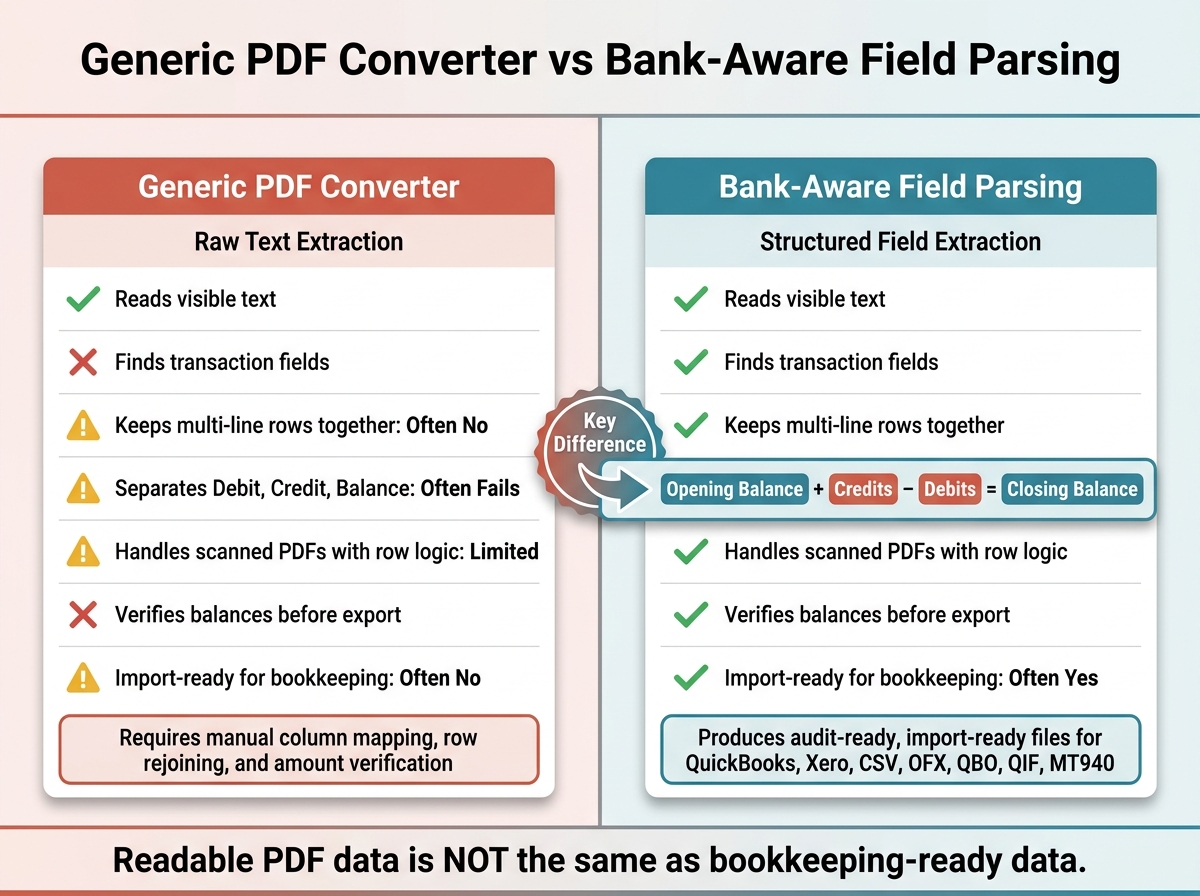
Generic PDF Converter vs Bank-Aware Parser: Bookkeeping Readiness at a Glance
STOP Wasting Hours On Bank Statements - This Free AI Excel Tool Does It All
sbb-itb-2afa642
How generic PDF converters handle bank statements
Generic converters keep the visual reading order of a PDF. That sounds fine at first, but it creates a mess for bank statements.
They don’t read the transaction structure the way a person would. Instead, headers, footers, page numbers, and subtotal lines can end up mixed in with actual transactions. Once that row structure falls apart, column mapping turns into manual cleanup.
Common parsing problems in transaction rows
Wrapped descriptions and split reference IDs often get pushed into separate rows or broken into fragments, which makes the transaction list much harder to reconcile. [1] That kind of row break is usually the first clue that plain text extraction isn’t enough.
Why debit, credit, and balance fields get mixed up
Parentheses can lose their negative meaning, and debit, credit, and balance columns can shift or merge depending on the PDF layout. [1] When that happens, amounts get assigned to the wrong fields before the file even reaches an accounting import.
Workflow impact for spreadsheets and accounting imports
Before import, users often have to do a lot of cleanup by hand:
- Map columns
- Delete repeated headers
- Rejoin split descriptions
- Check each amount manually
And there’s another problem. With no balance check built in, skipped rows or duplicate transactions can throw off reconciliation. That’s why bank-aware parsing focuses on field mapping and balance checks instead of dumping raw text into an export.
How bank-aware field parsing changes the output
Bank-aware parsing fixes a problem that generic converters often create: they flatten everything into a messy block of text. Instead, it rebuilds the transaction table first and then removes headers, footers, and other text that doesn't belong to the transactions. The result is cleaner output that moves into Excel or accounting imports with far less cleanup. [1]
Line-item parsing with structured field mapping
After the transaction table is separated, each row is mapped into clear fields. Wrapped descriptions and reference lines that sit under the main description stay tied to the correct row, so the full transaction remains intact in export files. [1] [3]
This step also normalizes date and amount formats. That matters a lot when you're working with statements from different banks that each use their own format for dates or dollar amounts. Even if the source layouts don't match, the output columns stay consistent. [1]
With the rows in place, the parser can then check each amount against the running balance.
Debit and credit recognition with running balance checks
This is where bank-aware parsing stands apart. It checks that opening balance + credits − debits = closing balance before anything gets exported. If the math doesn't work, the system can flag missing rows or duplicate rows before they end up in a spreadsheet. [1]
Scanned statement OCR and AI parsing for image-based PDFs
The same structure-aware logic also works for scanned statements. For image-based PDFs, bank-aware tools use OCR along with layout-aware parsing to rebuild rows, dates, descriptions, debits, credits, and balances. [1] That means scanned statements can still be used for bookkeeping imports.
Generic converters vs bank-aware parsing: a direct comparison for bookkeeping
Comparison table: extraction quality, validation, and output
The gap shows up fast when you ask a simple bookkeeping question: is the file ready to import, or does someone have to fix it first?
Once row parsing and balance checks are on the table, that’s the whole game. The tool that saves time isn’t the one that pulls out the most text. It’s the one that gives you bookkeeping-ready data with the least cleanup.
| Feature | Generic PDF Converter | Bank-Aware Field Parsing |
|---|---|---|
| Transaction Row Accuracy | Breaks on wrapped descriptions and page boundaries | Reconstructs multi-line rows into single, complete transactions |
| Column Mapping | Often merges or misaligns debit, credit, and balance fields | Maps directly to Date, Description, Debit, Credit, and Balance |
| Debit/Credit Handling | May mix up signs or collapse both columns into one | Recognizes transaction types and normalizes amounts correctly |
| Balance Verification | None - copies visible text only | Checks Opening Balance + Credits − Debits = Closing Balance before export |
| OCR Performance | Struggles with scanned or image-based PDFs | OCR built for statement layouts |
| Bookkeeping Readiness | Low - requires significant manual cleanup | High - produces import-ready files with accounting-ready columns |
In bookkeeping, validation matters more than raw extraction because one misread row breaks reconciliation. [1]
That becomes a big deal when the file needs to reconcile, import cleanly, or hold up during an audit review. A converter that only copies what it sees can look fine at first glance. Then one broken line or flipped amount throws off the whole set.
Which approach fits common U.S. finance tasks
For bookkeeping, the best option is the one that keeps every transaction row and amount intact without manual repair.
For reconciliation, audit support, and catch-up bookkeeping, the test is pretty direct: does each transaction make it through import with the right date, amount, and balance? If the answer is no, the cleanup work lands back on you.
Where ClearlyLedger fits
That’s the workflow ClearlyLedger is built for. ClearlyLedger converts scanned and text-based PDF bank statements into balance-verified Excel, CSV, QuickBooks CSV, Xero CSV, OFX, QBO, QIF, and MT940 files, with files processed in memory and deleted after conversion. [1]
Conclusion: Raw text is not the same as bookkeeping-ready data
The gap is pretty simple: readable is not the same as usable for bookkeeping. Generic PDF converters pull text off the page. Bank-aware parsers pull out transaction fields. That’s a big difference. Extracting text from a PDF is not the same as producing bookkeeping-ready data - generic converters stop at text extraction, while bank-aware parsing turns statement text into structured, import-ready transaction data.
What matters here isn’t just getting data into a spreadsheet. It’s getting an audit-ready file that you can filter, sample, and reconcile before import. A raw text extraction may look complete at first glance, but it can still throw off reconciliation if one amount lands in the wrong column or a multi-line description gets split across rows. Balance verification catches those issues before the file reaches your books. [2]
That’s why field recognition matters more than raw extraction. For bookkeepers and accountants, the test is simple: does the file reconcile cleanly without manual repair? If the answer has to be yes, then the tool needs to understand bank statement structure, not just copy text.
FAQs
Why isn’t plain PDF text enough for bookkeeping?
Plain PDF text isn't enough for bookkeeping because it strips away the structure you need to keep records clean and accurate.
Generic PDF converters often fall apart on bank statements. They can mangle scanned files, split wrapped transaction descriptions, repeat headers, skip rows, and ignore running balance logic. And without bank-aware parsing, there's no built-in check that opening balance + credits - debits = closing balance.
How do balance checks catch statement errors?
Balance checks catch errors by matching extracted transactions against the statement’s summary figures. ClearlyLedger checks that the opening balance, plus total credits, minus total debits, equals the closing balance.
If those numbers don’t line up, it flags the gap before export. That helps stop missing or duplicate rows from slipping into your bookkeeping workflow and keeps the final spreadsheet in line with the original statement.
Can scanned bank statements still import cleanly?
Yes. ClearlyLedger uses OCR to read scanned and image-based PDFs, then pulls out transaction details like dates, descriptions, debits, credits, and balances.
It also checks that the opening balance, credits, and debits match the closing balance. If something looks off, it flags the issue before export. That gives you a more accurate, audit-ready bookkeeping workflow.
Loading interactive converter… Try ClearlyLedger free