Generic PDF Tools vs Bank-Aware Extraction
Bank-aware extraction keeps debits/credits correct, verifies balances, and cuts manual cleanup compared with generic PDF converters.
Last updated 2026-06-26
If I process bank statements every month, bank-aware extraction is the better fit. It keeps debits and credits in the right place, checks that Opening Balance + Credits − Debits = Closing Balance, and cuts the manual fixes that generic PDF tools often leave behind.
Here’s the short version:
- Generic PDF tools turn PDFs into tables based on page layout.
- Bank-aware tools read the statement like a bank record, not just a document.
- Generic tools often break on wrapped descriptions, shifted columns, scanned PDFs, and sign handling.
- Bank-aware tools are built to keep dates, amounts, balances, and transaction direction intact.
- That matters because generic tools may need 15–20 minutes of cleanup per statement, while bank-aware output is much closer to import-ready.
- On hard bank layouts, generic converters can fail 60%–70% of the time, while bank-aware parsers can reach up to 99.7% accuracy.
If I had to sum it up in one line: one tool gives me a table, the other gives me data I can use.
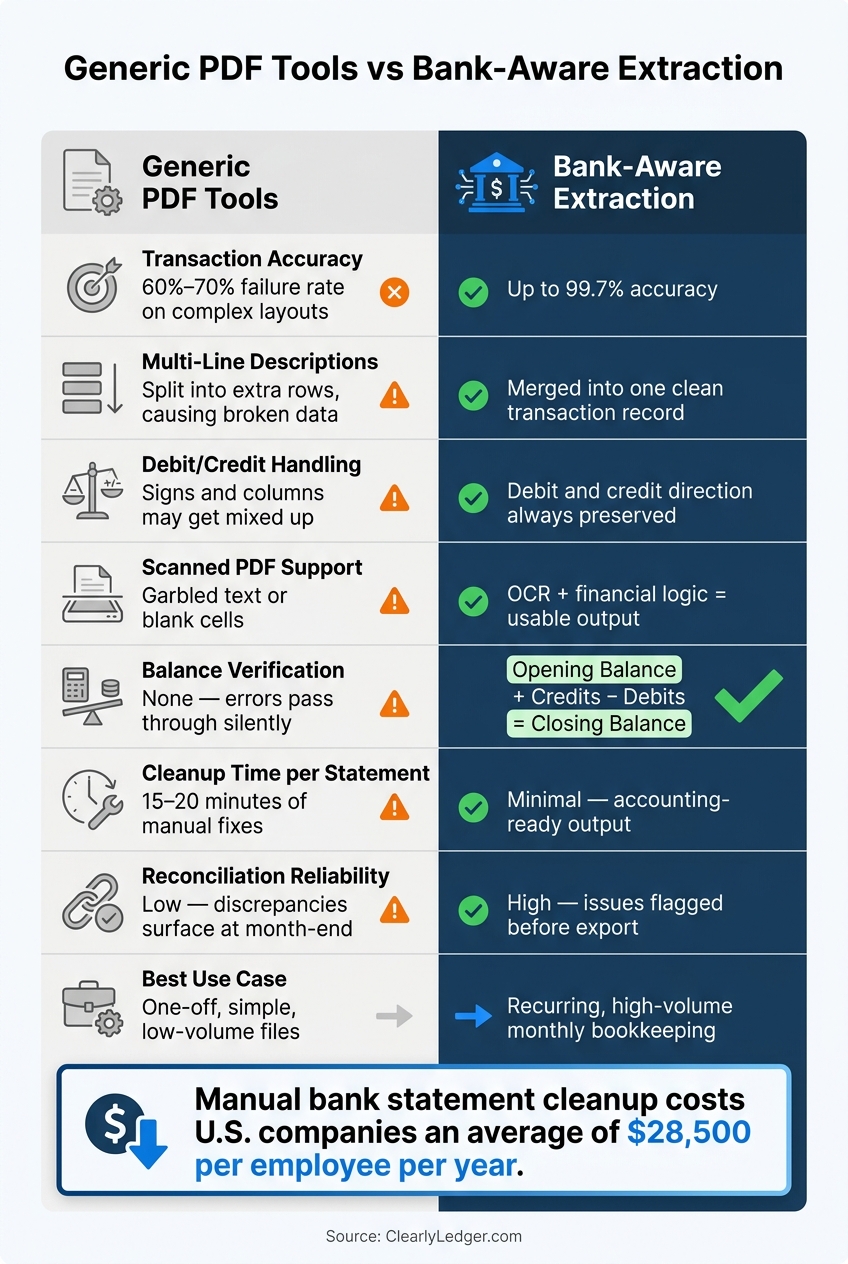
Generic PDF Tools vs Bank-Aware Extraction: Key Metrics Compared
Converting PDF Bank Statements into CSV or QuickBooks Bank Feeds (for Desktop or Online)
Quick Comparison
| Criteria | Generic PDF Tools | Bank-Aware Extraction |
|---|---|---|
| How it reads the file | Layout guessing | Statement logic + balance checks |
| Multi-line descriptions | Often split into extra rows | Kept in one transaction |
| Debit/credit handling | Signs and columns may get mixed up | Debit and credit direction stays clear |
| Scanned PDFs | Often messy or incomplete | OCR plus bank-statement rules |
| Balance check | None | Checks opening, activity, and closing balance |
| Cleanup work | Higher | Lower |
| Best use | One-off, simple files | Recurring bookkeeping |
For U.S. bookkeeping, that gap matters fast. Wrong signs, broken rows, or missed balances can lead to bad imports, reconciliation issues, and more review time. So if I care about accuracy, cleanup time, and balance checks, bank-aware extraction is the safer choice.
2. Generic PDF tools: where they work and where they break
Generic PDF converters can do a decent job with clean, digital statements that use simple tables and come in low volume. But most bank statements aren't that neat. The trouble usually starts in three places: descriptions, columns, and sign handling.
Common extraction errors in transaction tables
The most common issue is multi-line transaction descriptions. When a description wraps onto a second line, generic tools often treat that second line as a new row. That leaves blank amount cells and pushes the rest of the table out of place.
Column shifting is another common failure. These tools often guess column positions based on spacing and lines, so even a small layout change can throw everything off. A withdrawal may land in the deposit column, or the other way around.
Sign and direction errors create the same kind of mess. Many tools remove minus signs or credit suffixes like CR, which means debits and credits can come through as positive values.
Scanned statements make things worse. Even 99.5% character accuracy can still lead to about a 4% row error rate on a 12-column statement. And once those errors slip through, they can flow straight into your accounting software.
Why cleanup time grows quickly
Each error type creates its own cleanup job. Broken descriptions need to be stitched back together. Signs need to be flipped one by one. Shifted columns need to be checked against the original PDF. And because generic tools don't verify totals, many errors don't show up until someone reviews the file by hand.
In practice, cleanup for a single complex statement can take 15–20 minutes. Spread that across a full client roster and month-end volume, and the time cost adds up fast. Manual data entry and cleanup for bank statements costs U.S. companies an average of $28,500 per employee per year in remediation and labor.
These errors pile up fast, so the table below sums up the main bookkeeping risks.
Comparison table: Generic PDF tool limitations in bookkeeping
| Aspect | Generic PDF Tool Behavior | Bookkeeping Impact |
|---|---|---|
| Transaction Extraction | Splits multi-line descriptions into separate rows | Hours of manual row deletion and description stitching |
| Scanned PDFs | Returns garbled text or fails to recognize tables | Forces manual re-entry of entire statements |
| Balance Handling | No math checks on opening or closing totals | Silent errors pass into accounting software undetected |
| Column Alignment | Guesses positions from spacing; breaks on layout shifts | Amounts land in the wrong columns, such as debits logged as credits |
| Reconciliation Risk | No internal validation; flipped signs go unnoticed | Unbalanced books can surface only at month-end close |
These are the exact kinds of failures bank-aware extraction is built to catch.
sbb-itb-2afa642
3. Bank-aware extraction: accuracy, balance checks, and accounting-ready output
How bank-aware parsing improves transaction accuracy
Generic tools try to guess rows from the page layout. Bank-aware tools read the statement's structure and check the balance logic at the same time.
Here's where that matters. If a transaction description wraps onto a second line, a bank-aware parser joins both lines into one record. A generic tool can split that same entry into two rows. Now you have a broken transaction sitting in the sheet, and it's easy to miss until someone has to stop and fix it by hand.
Bank-aware extraction also cleans up the output into columns that fit accounting work: Date, Description, and either Amount or separate Debit/Credit fields, plus Balance. Dates stay as actual date fields. Amounts keep the right debit or credit sign. Bank-specific parsers can reach up to 99.7% accuracy. By contrast, generic PDF-to-Excel converters miss or misread 60% to 70% of bank statements with merged cells and wrapped text.
Fewer extraction mistakes means less cleanup later, which becomes even more important in the next step of review.
Why balance verification changes the review process
The biggest difference is validation. Put simply, the system checks whether the numbers work: Opening Balance + Credits − Debits = Closing Balance. If that equation fails, something went wrong during extraction.
Without balance verification, shifted columns or dropped rows can slide into the ledger without anyone noticing. With it, bookkeepers can focus on the rows the system flags instead of checking every line one by one. That's a big shift. The job moves from full manual inspection to targeted review.
ClearlyLedger as an example of bank-aware conversion
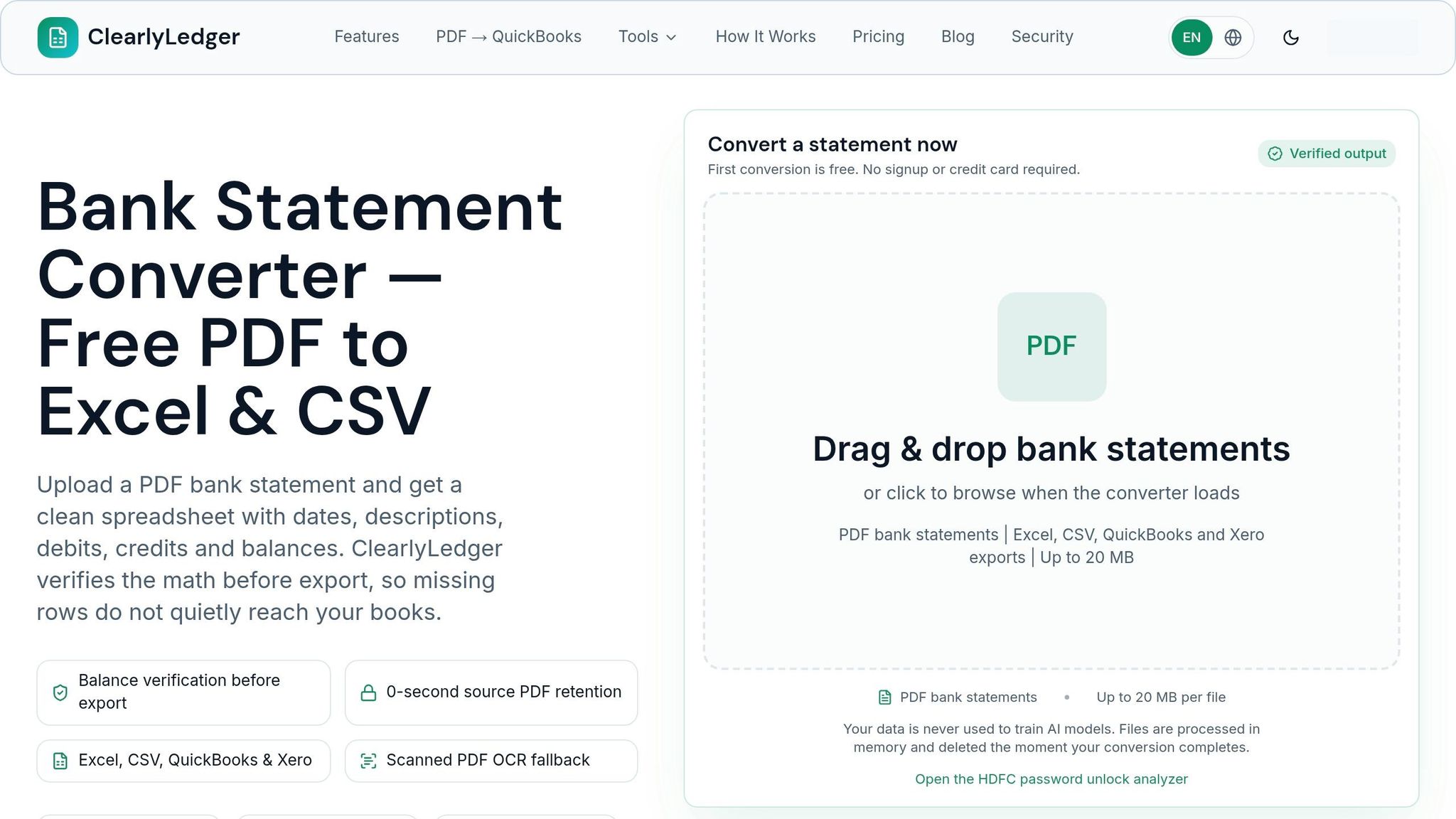
ClearlyLedger is built for this exact job. It converts scanned and text-based statements into balance-verified Excel, CSV, QuickBooks CSV, Xero CSV, OFX, QBO, QIF, and MT940 files using OCR, AI parsing, batch processing, deduplication, and in-memory processing, with files processed in memory and deleted after conversion.
The practical result is simple: less manual review and faster reconciliation.
4. Side-by-side comparison for finance teams
Transaction accuracy, balance verification, and bank-format handling
Once you move past basic balance checks, the day-to-day question for finance teams is simple: how much cleanup is left after the export? That’s where the gap between these tools starts to show.
Generic PDF tools usually depend on layout guesses. They look at spacing, column position, and page structure, then try to rebuild the table from there. Bank-aware tools take a different route. They read the statement using financial rules, identify debits and credits, and check those entries against the running balance on the statement.
That difference shows up fast in the numbers. Generic converters fail on bank statements 60% to 70% of the time when the layout includes merged cells or wrapped text. Bank-aware parsers can reach up to 99.7% accuracy across 10,000+ bank formats.
Scanned statements make the gap even bigger. A generic tool will often spit out garbled text, broken rows, or blank cells from a scanned PDF. Bank-aware tools use OCR as a fallback, then apply financial logic on top of that OCR output. So even when the source file is messy, the result is still usable for bookkeeping work.
Cleanup time, reconciliation results, and workflow fit
The export step is where finance teams feel the pain. Generic tools often need 15 to 20 minutes of manual correction per statement to fix column shifts, merged rows, and reversed signs. One statement may not sound like much. But across a month-end stack, that time adds up fast.
Reconciliation follows the same pattern. Generic tools don’t check the math, so a bad digit or a missing row can slide straight into the ledger with no warning. Bank-aware tools catch those issues before export, which means the team can spend time on exceptions instead of checking every single line again.
For recurring bookkeeping, that matters more than getting a plain table out of a PDF. A table that looks fine but carries hidden errors can slow down close and create extra review work later.
The table below shows how this plays out in practice.
Comparison table: Generic PDF Tools vs Bank-Aware Extraction
| Criteria | Generic PDF Tools | Bank-Aware Extraction |
|---|---|---|
| Transaction Accuracy | 60%–70%; often mangles multi-line rows | Up to 99.7%; merges wrapped text correctly |
| Scanned Statement Support | Poor; often produces garbled text or blank cells | Strong; OCR fallback with financial logic |
| Balance Verification | None; errors can pass through silently | Mathematical check: Opening Balance + Credits - Debits = Closing Balance |
| Cleanup Time | High; manual row merging and sign fixes required | Minimal; output is accounting-ready |
| Reconciliation Reliability | Low; discrepancies often surface during close | High; discrepancies flagged before export |
| Fit for Bookkeeping Work | Occasional, simple one-off conversions | Recurring, high-volume monthly bookkeeping |
5. Conclusion: Which approach fits bookkeeping work better
After looking at extraction accuracy, balance checks, and cleanup time, the answer is pretty clear. Generic PDF tools can pull a table from a PDF. But they don’t check balances or reliably keep transaction signs in place, which means errors can slip into the ledger without anyone noticing right away. That’s the exact kind of problem that slows down repeat bookkeeping work.
Bank-aware extraction handles the parts that matter most in day-to-day statement processing.
Key takeaways for accountants and bookkeepers
For U.S. firms working through statements each month, the choice comes down to three things:
- Accuracy - Bank-aware tools pull rows more reliably, reaching up to 99.7% accuracy on standard bank layouts where generic tools miss the mark.
- Balance verification - They check that Opening Balance + Credits − Debits = Closing Balance before the file leaves the converter.
- Cleanup time - They cut manual fixes down to minutes instead of dozens and export accounting-ready files that skip the reformatting step.
For firms processing statements every month, ClearlyLedger is a strong fit. It works with scanned and text-based PDFs, checks balances, exports accounting-ready files, and uses privacy-first in-memory processing. That means faster review, cleaner imports, and fewer reconciliation surprises.
FAQs
How do balance checks catch extraction errors?
Balance checks catch the quiet extraction mistakes that are easy to miss at first glance. The idea is simple: compare the extracted data with the source statement and see if the numbers still add up.
They do this in two ways:
- Check whether the opening balance plus net transactions equals the closing balance
- Recalculate the running balance line by line
If either check fails, the tool flags the rows tied to the mismatch. That makes it easier to spot OCR misreads and layout problems, like sign flips or missing rows.
When is bank-aware extraction worth using?
Bank-aware extraction makes sense for professional bookkeeping, monthly reconciliations, and client work where accuracy matters and manual cleanup eats up too much time.
It’s a strong fit for scanned statements, complex or multi-page layouts, and wrapped transaction descriptions. Because it applies financial checks like running balance verification and proper positive or negative signs, it can catch mistakes that slip past manual review. It also helps with high-volume work by producing standardized outputs.
Can bank-aware tools handle scanned statements?
Yes. Bank-aware tools can process scanned statements with OCR, which turns an image into readable text.
From there, the tool reads the statement’s rows and columns and makes sense of the financial data in context. Since scanned files don’t come with a text layer, these tools also check the math by confirming that the opening balance, plus credits, minus debits, matches the closing balance.
Loading interactive converter… Try ClearlyLedger free